


The Pebble smart watch, showing three designs and different downloadable watch 'faces'
Android etiketine sahip kayıtlar gösteriliyor. Tüm kayıtları göster
Android etiketine sahip kayıtlar gösteriliyor. Tüm kayıtları göster
16 Mayıs 2014 Cuma
3 Haziran 2013 Pazartesi
05:32
New mobile phones 2013 - what's coming up?

Of course, there's always a chance you don't give two hoots about the phones we've listed here, and want to know what shining lights are set to glimmer into focus in 2013.
With MWC 2013 out of the way, we've got a pretty clear picture of how the mobile landscape is shaping up, and with many of you months away from your contract upgrade, here's a selection of new phones to whet your appetite:
LG Optimus L7 2
The LG Optimus L7 2 is a surprisingly capable budget smartphone which offers up plenty of features for not a lot of cash - although the naming of it will confuse potential buyers aplenty.
We were impressed with its 8MP camera, stylish design and smooth operation, although web surfing could do with a bit of a boost.
Out of the three new L-Series 2 handsets the LG Optimus L7 2 is our favourite and we reckon it will offer consumers pretty decent value for money when it lands later this year.
Samsung Galaxy Young
The Samsung Galaxy Young is a phone that you can imagine the younger teenager who wants a modern smartphone asking for at their birthday. It won't cost that much money to pick up without a contract, and with the ability to set data limits on the phone, parents will be happy that they won't be hit with whopping bills.
It's an uninspiring phone for the spec-hungry fan, but it copies theSamsung Galaxy S3 styling and for that reason alone we can see a few skirt hems being tugged as children give their parents the big eyes when looking for a new phone
Samsung Galaxy Xcover 2
The Samsung Galaxy Xcover 2 is one of the better phones we saw at MWC 2013, simply because it was a different proposition to the rest of the identikit Samsung Galaxy family.
We didn't get to dunk it underwater, which is still a favourite test of all mobile phone reviewers, but we're pretty confident it can stand the heat. Also literally.
If you're in the market for a tough, attractive next-gen smartphone, the Samsung Galaxy Xcover 2 could certainly be worth checking out.
ZTE Grand S
Taking a look at the specs the ZTE Grand S looks to be a blockbuster of a phone and one which could easily trump the big boys of the mobile market, with a full HD 5-inch display, 1.7GHz quad-core processor, 2GB of RAM, 13MP camera, 4Gconnectivity and Android Jelly Bean
The reality however is not so great, with a sluggish interface and disappointing screen quality seriously wounding the Grand S..
Perhaps ZTE will be able to iron out the kinks before the handset hit shelves, but we're not holding our breath. The Grand S will need a pretty special price tag if it's going to succeed.
Huawei Ascend Mate
The line between smartphone and tablet continues to blur and the Huawei Ascend Mate does nothing to help the situation.
Huawei wants you to ditch your tablet in favour of the Ascend Mate, which in its eyes can double as both a slate and a phone.
We're not completely sold on that philosophy and tend to sway towards the theory that a 6.1-inch phone is pretty mad – verging on unnecessary.

2 Haziran 2013 Pazar
00:34
download skype for mobiles android
 Shop Amazon Electronics - Over 40 Off Select iPhone Cases
Experience Skype in the palm of your hand.
Here’s just a few of the great things you can do with Skype for Android:
Free face to face video calls and instant messaging over a 3G or WiFi connection.
Low cost calls and text messages to mobiles and landlines.
Send photos, videos and files of any size for free.
Sign in with your Messenger ID and have your Messenger, Hotmail and Outlook.com contacts in one place.
Take Skype with you today.
Get Skype for Android
Still need help? Visit support
Shop Amazon Home - Up to 40 Off Cooling Products

29 Mayıs 2013 Çarşamba
03:46
Onkyo TX-8050 Network Stereo Receiver (Black) review
Classic Stereo Audio with Network Functionality

Onkyo's hi-fi revolution gathers pace with the TX-8050. This finely sculpted stereo receiver delivers two channels of audio precision to entertainment spaces where you don't need advanced video processing or multichannel audio. Gold plated, analog A/V inputs that ensure outstanding performance are augmented by digital audio inputs, Universal Port for Onkyo peripherals and a front USB input for direct digital connection of iPod®/iPhone®. The receiver's network capability, meanwhile, lets you stream internet radio or play audio from a PC or network audio storage device. Behind the smart aluminum façade lies a massive transformer and large capacitors that provide clean amplification power, which includes Onkyo's exclusive WRAT, and helps push performance well beyond the norm.
Onkyo network A/V receivers give you access to more internet radio stations than any other brand...period.

Streaming your choice of internet radio through your TX-8050 receiver gives you unsurpassed sound quality and access to a virtually infinite selection of world class music. Enjoy your own personal concert from anywhere in the world... right in your own living room.
All Onkyo network receivers are also compatible with Microsoft’s Windows® 7 platform, which includes the DLNA 1.5-specified “Play To” media-streaming feature so you can easily stream music store on PCs connected to your home network. This internet connectivity has the added benefit of making firmware updates simpler than ever.
Onkyo's Remote Apps: Seamless, Intuitive Control

The Onkyo Remote App for iPod touch/iPhone and the Onkyo Remote App for Android both provide an intuitive way to operate Onkyo network A/V receivers. At your fingertips, you have the ability to control input sources, adjust settings, and enjoy your content more seamlessly than ever. The app for Android even allows you to stream music directly from your Android device. The two Remote Apps are available separately as free downloads.
· Control your Onkyo Receiver via iPod touch/iPhone or Android Phone over Wireless Network
· Wirelessly Stream Your Music Stored on Portable Device (Android Only)
· General Remote-Control Operations
· Control Volume with the Accelerometer (iPod touch/iPhone Only)
· Control Multi-Zone Audio (Android Only)
· Selec Input Source, Network Source, and Radio Station
· Adjust Tone Control and Listening Modes
· Audio and Video Information Displayed
Take Your Stereo Wireless

Onkyo's UWF-1 Wireless LAN adaptor removes unwanted cables. This small, optional unit is worth way more than its tiny price. Connect the UWF-1 to the USB port on any compatible 2011 Onkyo network receiver, and bring your music through your wireless router into your Onkyo system. Now internet radio and audio files stored on your PC can be played back with the superior fidelity of your main Onkyo system — with no cable clutter. A sensible and inexpensive solution.
Made for iPod/iPhone

 Simply connect your iPod/iPhone via Front-Panel USB Port of the TX-NR8050 and play audio files stored on your iPod/iPhone or a USB flash drive. As the audio signals are transported in digital form, rather than analog, there is much less chance for signal degradation. The TX-8050 also incorporates Onkyo's exclusiveAdvanced Music Optimizer to compensate for lost bit information and improve the quality of compressed audio signals. End result: your music sounds cleaner and more faithful to the original.
Send Stereo to the Next Room: Zone 2
 Zone 2 pre-outs on the TX-8050 allow you to send a stereo audio signal to a second room equipped with an amplifier and a pair of speakers. You can either enjoy the same source in both rooms, or play a different source in Zone 2.
Spin Those Records
 Phono Input- We know there are those who have retained a love for vinyl. And we respect this most noble of devotions. Therefore, we still make the Phono Input that allows you to use your record player to spin those albums and hear them with pristine Onkyo sound quality.
Because, after all, it's all about Sound.
Specification
| Number of Channels | 2 |
| Power | 80W/Ch (8Ω, 20Hz-20kHz, 0.08% THD) |
| Network Capable | Yes |
| Made for iPod/iPhone (Direct USB input) | Front |
| Multiroom | Zone 2 Pre-outs |
| Subwoofer Pre-out | Yes |
| Phono Input | Yes |
| Composite Video I/O | 4 in / 2 out |
| Digital Audio Input | 2 Optical & 2 Coaxial |
| Analog Audio I/O | 6 in / 2 out |
| AM/FM Presets | 40 |
© Copyright 2011 Onkyo USA Corporation. All rights reserved.
Product Description
Onkyo's Hi-Firevolution gathers pace with the TX-8050. This finely sculpted stereo receiver delivers two channels of audio precision to entertainment spaces where you don't need advanced video processing or multichannel audio. Analog A/V inputs on the TX-8050 are augmented by digital optical and coaxial audio inputs, a Universal Port for Onkyo peripherals, and a front-side USB input for direct digital connection of iPod /iPhone . The receiver's network capability, meanwhile, lets you stream internet radio or play audio from a PC or network audio storage device. Behind the smart aluminum façade lies a massive transformer and large capacitors that provide clean amplification power and help push performance well beyond the norm.

21 Mayıs 2013 Salı
09:00
Review: Pebble's smart watch doesn't try too hard - but does what you need
 |
| English: Bluetooth Watch Deutsch: Bluetooth Digitalarmbanduhr mit Smartphone Anbindung, automatische Zeit Einstellung über Bluetooth, Telefon Rufnummernanzeige und Vibrationsalarm zur dezenten Ruf Signalisierung, SMS Anzeige (Photo credit: Wikipedia) |

Nowadays, when my phone rings, my wrist buzzes. When someone texts me, I don't look at my phone to find out what they said; I look at my watch.
Why? I've got a Pebble - the "smartwatch" launched on Kickstarter last year which hit its $100,000 target within two hours and had raised $10.2m from nearly 69,000 backers by the time it closed in May 2012 after a month. (I was one of those backers, with my own money.) So far, according to the site, it's delivered 85,000 of its watches, each costing $150 (£98). Yes, it's this year's buzzword, wearable computing, but you don't have to genuflect to Google or splash out $1,000 to get it. Plus it's unobtrusive.
Pebble describes it as an "E-paper watch for iPhone and Android". The "e-paper" bit might get some thinking you're going to be reading books on it. You're definitely not (the screen's only 1.26in - 3.2cm - diagonally). But it is great fun.
So what do you then get for your money? It's a watch, to start with. The face is 144x168 pixels, a large black/white e-paper display. I chose the black body and strap (you can get it in black, white, cherry red or grey). Open the box, and you're instructed to go to getpebble.com. That's a neat touch - no manual at all. The whole initial setup is done through its web page and then app.
Open that page on your smartphone, and it directs you to the iPhone or Android app store, where you download a free app which connects via Bluetooth. Through that, you can send software updates (such as new watchfaces) and, more usefully, back-and-forth notifications when someone calls or texts. (You can also set it to notify you when you get an email. Don't do this unless you never get email.)
The watchface is scratch-resistant (not -proof) and has an anti-glare coat; I find it very readable in all lights, except when it's dark. Then you have the options of an automatic backlight (adjusted to light levels), or being able to flick your wrist to activate the backlight. The strap feels like rubber; it's wide (to go with the watch) but not uncomfortable.
Charging is via a USB lead terminating in a magnetic attachment to a pair of contacts on the left-hand side of the watch; I assume a micro-USB slot would have taken up too much internal space and created waterproofing problems (it is waterproof, at least for swimming). So don't lose that charger; you'll be needing it every four or five days (in my limited experience, though the makers claim up to seven.. probably if you have Bluetooth off) and it's unique.
One bad thing: the interface doesn't show the battery level (even in the phone app), which can leave you in the lurch without warning. The charge level only shows when you're charging, and even then only in the menu, as opposed to standard watch, display.
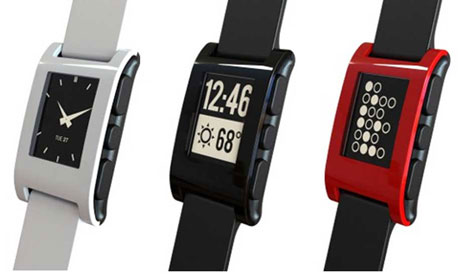 Pebble watch: note the control buttons on the side.
The controls are pleasingly simple. There's a large rectangular button on the left-hand side which takes you back up a level of control; press it enough times and you'll reach the time display, which is the default.
On the right are three buttons (one large, one small, one large) which function as "up, choose, down" for scrolling through menus. Pebble doesn't try to do a lot of things. You turn on the Bluetooth, connect it to your phone, and that's mostly it. You can control the music playback on your phone via the right-hand buttons (it shows the artist, album and track name, though not album art; the buttons will advance a track, play/pause, skip back). However, that's really a party piece; unless you're on the other side of the room, it's simpler just to pull out your phone or, on headphones with a mic, click the control button, than to press the two buttons required to change the music. And yes, running Bluetooth will use some phone battery - perhaps 5% over a normal day. Turn it off, and the Pebble still works as a watch.
Next you're expecting a touchscreen with icons and apps, aren't you? No such thing. Pebble's designers have wisely held back from overegging the interaction pudding. The screen isn't touch-sensitive, and you won't be squinting and trying to operate tiny physical or onscreen buttons. (Looking at you, Sony Smartwatch.)
Presently, the on-watch functions are simple: you can set alarms; choose different watchfaces (which you download via the phone app); decide how you want the phone's backlight to come on; and whether you want notifications from your phone on. (You probably do, else it's just a watch). On-watch apps haven't happened yet. But there are fortnightly software updates. It's probably coming.
Notification
It's the notifications that make this stand out. A little bit of configuration on your phone and you can get incoming calls and texts displayed (and emails - only recommended if you never get email). This is the great thing about Pebble: you can figure out whether to ignore a call by looking at the number (if it's in your address book, it'll show up; you can also reject calls from the phone) and you won't miss texts even if your phone is on silent. It's also a lot less intrusive to look at your watch during a meeting than to take out your phone.
Pebble says you can add calendar alerts, Facebook Messages, tweets, and weather alerts to the notifications; I do wonder what sort of weather alert (short of a tornado) you'd want to know about, but in principle it's putting everything just where you want it.
I find that I can read entire text messages on it without trouble, though spotting the name of a caller is harder (perhaps because it feels more urgent to decide).
But phone calls and texts are just the start. Pebble last week released an SDK that will let developers push notifications from third-party apps; think of apps that you'd like to give you updates, but which you don't want to have to keep monitoring your phone for, and you've found a use for the Pebble. It's working on apps for bicyclists, golfers (err…), runners (it syncs with Runkeeper), and whoever else they can think of. (The forums are pretty busy with people suggesting stuff.)
Do I like it? No, I really love it. My wife gives me pitying looks when I try to describe its benefits, but a couple of weeks in the fun hasn't worn off. And the idea that it could connect with more apps (train times? Concert ticket availability? Just think of things you'd like to be quietly notified about) is enticing. If it shipped with those apps and capabilities preinstalled, it would be an instant five-star product.
One galling point: HM Revenue & Customs, eager to generate tax revenue from somewhere (since it can't seem to get big companies to pay), slaps an import tax of £25.06 on each one. That brings the total price for the device to around £125. Crazy? A bit. But I'm convinced thatwearable technology is the future, or at least a significant component of it. And at this price, it's worth it.
Speeds and feeds
Specifications:
• Load apps using Bluetooth
• 144 x 168 pixel display black and white e-paper
• Bluetooth 2.1+ EDR and 4.0 (Low Energy)
• Four buttons
• Vibrating motor (for alerts)
• Three-axis accelerometer with gesture detection
• Load apps using Bluetooth
• 144 x 168 pixel display black and white e-paper
• Bluetooth 2.1+ EDR and 4.0 (Low Energy)
• Four buttons
• Vibrating motor (for alerts)
• Three-axis accelerometer with gesture detection
Compatibility: iPhone 3GS, 4, 4S, 5 or any iPod Touch with iOS 5 or iOS 6. (iOS 5 and iPhone 3GS have restricted feature sets). Android devices running OS 2.3 and up, including Android 4.0. No support at present for Blackberry, Windows Phone, or Palm phones.
Price: $150. Customs and shipping charges will apply outside the US.

05:57
Review: HTC One
A year ago, I finished off my review of HTC’s One X by predicting great things for it and its maker. And then Samsung’s Galaxy S3 merrily outsold it ten to one. Thing is, that wasn’t a case of me being a colossal twit. The One X is the better phone - it’s better made, better looking and better to use.
Luckily for HTC, the new One is loaded with some cool headline-grabbing features to lure S3 owners and potential S4 buyers its way, including front-facing stereo speakers, a screen with a spectacularly high pixel density, a camera with a massively pixel-packing sensor, a Qualcomm Snapdragon 600 chip that goes like stink and an all-new version of HTC’s Android overlay, Sense, to name but a few.
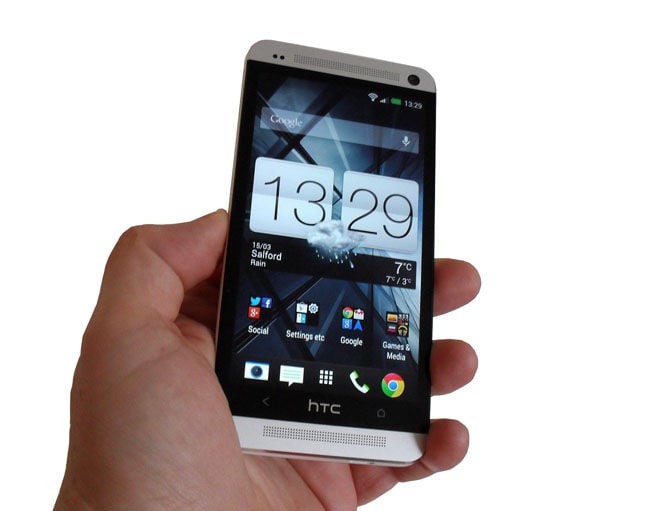
HTC's One: a truly lovely bit of kit?
Right away it’s clear that physically the One is a truly lovely bit of kit. I’m not going to dignify the accusations that it looks like an iPhone 5. It only does to the blind or terminally dim. The aluminium unibody feels cool and solid, and despite housing a 4.7-inch screen and a 2300mAh (fixed) battery weighs only 143g. It’s just a gnat’s pizzle over 9mm thick.
As a compromise between usability and premium heft it’s bang on the money. So is the brushed aluminium and white colour scheme. The absence of a camera shutter key is its only design failing.
As is becoming the norm, the 4.7-inch screen is a 1920 x 1080, Full HD affair with a whopping 469dpi pixel density. It uses HTC’s favoured “Super” LCD tech rather than Samsung’s “Super” AMOLED. This means that while the colour palette is more natural when it comes to still images and video, hues are less eye-poppingly vivid the rest of the time.
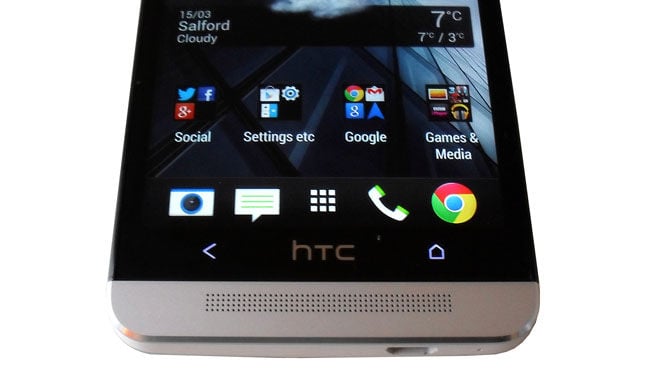
The HTC logo is entirely decorative
Which you prefer is a matter of personal choice. I often use my phone to watch video so I prefer the more natural look of LCD. Either way, the panel wants for nothing in terms of brightness or expansive viewing angles and is almost supernaturally sharp.
While some Android phone makers still insist on physical buttons, HTC is busy ditching even the virtual ones. The One only has two below the screen - Back and Home - flanking the purely decorative HTC logo. If you want to launch Google Now, you long-press on Home or double-tap to see your recent apps.
I’m not entirely sure using the HTC logo as the Home button wouldn't have been a better solution, but I imagine I’d get used to the new layout in short order.
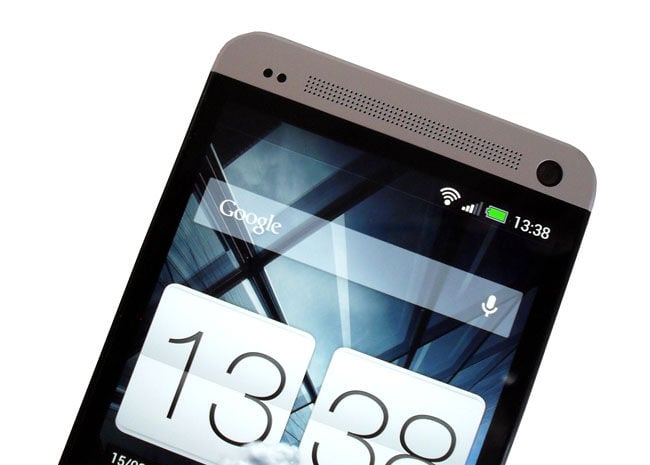
The upper speaker and the rather good 2.1Mp webcam
Modern smartphones are getting so ludicrously powerful that spending time banging on about benchmarks scores is pointless. Thanks to its Qualcomm APQ8064T Snapdragon 600 chipset, which incorporates a quad-core 1.7GHz Krait-class CPU with 2GB of RAM, the One is faster and more powerful than a smartphone has arguably any real need to be.
The SunSpider browser score of 1182 was more down to earth but in day-to-day use that’s not something you are ever going to notice and is more a reflection of the fact that Chrome just doesn’t excel at JavaScript rendering.

05:52
Review: Asus PadFone 2 phone-tablet combo
 |
| English: Back side GPSMap 62s without the rear lid Description: 1. antenna 2. micro USB connector 3. external antenna connector 4. rear lid 5. micro SD card slot 6. place to install the battery Polski: Tylna strona GPSMap 62s ze zdemontowaną pokrywką baterii Opis: 1. antena 2. złącze micro USB 3. złącze do podłączenia anteny zewnętrznej 4. pokrywka baterii 5. gniazdo na karty micro SD 6. miejsce na instalację baterii (Photo credit: Wikipedia) |
I thought the first Asus PadFone was a jolly good idea the moment I clapped eyes on it. Sadly it never made it to these shores but the PadFone 2 has. In a nutshell, what we have here is an Android smartphone that can be docked into a dumb tablet giving you not only a choice of two screen sizes but also the convenience of one data connection, and unified app selection and storage.
The phone part of the duo is solid, physically well proportioned and, at 135g, reasonably light. It looks thinner than its actual 9mm front-to-back measurement thanks to a tapering metal frame. There’s a bit of chamfering below the off-screen capacitive buttons to add a touch of style, and it has a pleasingly tactile patterned back.
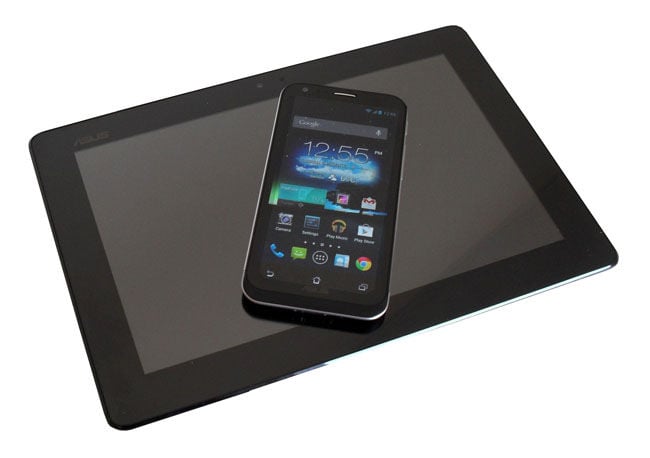
Asus' pad'n'phone: the PadFone 2
In fact, the PadFone's phone feels like Asus’ take on the LG-made Google Nexus 4and, thanks to the same quad-core 1.5GHz quad-core Krait-class Qualcomm Snapdragon processor, 2GB of Ram and a very similar 4.7-inch, 1280 x 720 IPS LCD display, that’s exactly how it performs. Thankfully the Asus is less prone to overheating when working hard.
The tablet part of the equation - or "station" as Asus calls it - is just a battery and a 10.1-inch, 1280 x 800 IPS LCD screen. It isn’t as pleasant to hold as the phone because it’s made of plastic and has a rather sharp and obvious seam where the front joins the back.
The slight lip that surrounds the screen doesn’t do anything to lessen the feeling that the tablet has been built down to a price. Still, at £599 for the lot, something had to give.
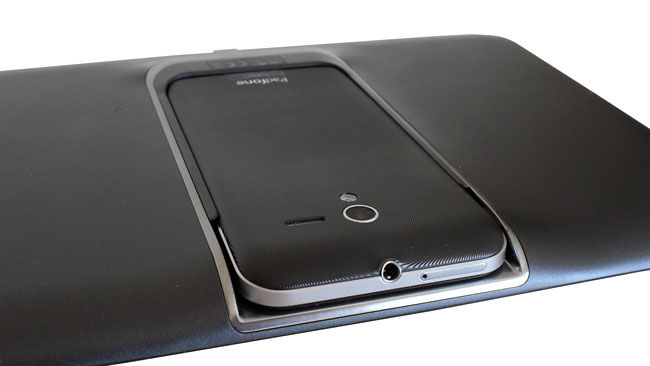
Docked
Docked the entire kaboodle weighs 649g which puts it between the 662g Apple iPad 4 and the 603g Samsung-made Google Nexus 10. The docking slot at the back adds a slight bulge to the design raising the centre profile from 9mm to 16mm but that has no impact on usability.
Both the phone and tablet screens are made from Corning Gorilla Glass and have an oleophobic coating, though the material sprayed on the tablet doesn’t seem to do its job all that well. Other than that both screens cut the mustard, offering ample brightness thanks to a super-illuminated setting that Asus calls "Outdoor Mode".
Naturally with a pixel density of only 149dpi the tablet screen is noticeably less crisp than the 312dpi phone. It suffers in comparison to the likes of the Nexus 10 and iPad 4 too, but its still a resolution I could live with.
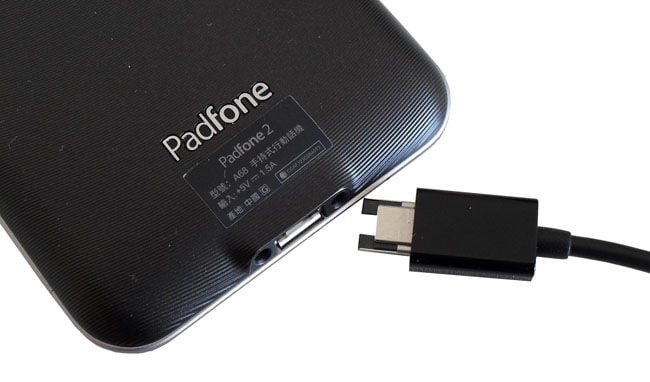
The phone and dock use a modified micro USB port
There’s no need to worry about the phone not having the grunt to power the tablet because it returns an AnTuTu benchmark score of well over 21,000. Undocked you have a very powerful phone, docked you have a very powerful tablet.
That there is no storage expansion will be a dealbreaker for some folk and means you are stuck with the handset’s 32GB or just over 26GB after system requirements. Talking of system, the PadFone 2 runs Jelly Bean 4.1.1.
At the bottom of both phone and tablet you’ll find a modified micro USB port for charging, data transfer and video streaming. As well as MHL, the port also supports USB On The Go. Curiously you need to turn the USB connector over when you swap it between phone and tablet. You can use regular micro USB cables for both data connection and charging but they fit loosely and come adrift easily. That’s a pain if you want to charge the PadFone and use it at the same time but don’t have the special Asus cable to hand.
Kaydol:
Kayıtlar (Atom)


