9 Ağustos 2014 Cumartesi

Redbox to Make Some Kiosks Accessible to the Blind


Popular video rental service Redbox agreed in a settlement to make 4,000 of their 35,900 kiosks located in California accessible to people who are blind or visually impaired. The service, which is commonly found in supermarkets and other public areas, is inaccessible to blind or visually impaired users. As part of the agreement, Redbox agreed to add headphone jacks, text-to-speech output, and tactile keyboards to kiosks. The roll-out of accessible video rental boxes will be gradual and is planed to take longer than two years. In the interim, Redbox has also agreed to provide phone support to help blind customers navigate the rental process. It is not clear if Redbox plans to add more DVDs with audio descriptions to benefit its new larger customer base of visually impaired users, but such a plan would seem to make sense. The settlement deal will inevitably increase Redbox's potential customer base by providing access to more people with disabilities. Unfortunately, the settlement seems to only cover a small fraction of Redbox kiosk in California. Hopefully, other kiosk companies will make their services accessible as well.

17 Temmuz 2014 Perşembe

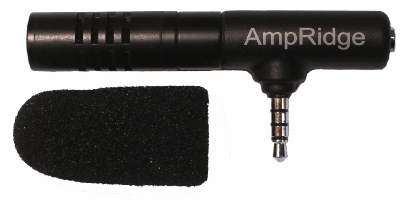
Too Much Background Noise when Recording Lectures with Smart Phone or Table Built-in Microphone? Check Out the Ampridge MightMic


Mobile devices are convenient tools that students use to record classes and lectures, reporters use to record news conferences, and business people use to record meetings. Some use note taking apps like Notability, Remarks, or Livescribe+ to augment their notes with audio recordings. The benefits of recording the audio can be minimized by poor quality recordings from built-in microphones.

Built-in microphones tend to do a poor job of isolating sounds which results in background noise that makes the desired sounds difficult to hear, especially for people with hearing impairments.

The AmpRidge MightyMic microphone plugs directly into the headphone jack of any smartphone, tablet, or computer that supports microphone input. It proves an alternative audio output jack so users can still plug in headphones while the microphone is plugged in. Its compact size makes it easy to use in class and makes in relatively discrete. The MightyMic microphone works well with an iPhone and is only slightly longer wider than the width of the phone. The microphone  even worked fine with my bulky iPhone case. Once plugged in you can angle the microphone towards the front of the room to capture the most important sounds. In my testing, the MightyMic microphone was on par with the built-in iPhone microphone for close range recording, but worked considerably better than the built-in microphone in a classroom or outdoor long range environment. The MightyMic microphone reduced background noise resulting in better sounding audio playback. If you frequently record classes, lectures, or meetings and are less than satisfied with your device's built-in microphone, the MightyMic mic is a good option to give your sound a boost. If you're looking for a big improvement in sound quality quality you may have to look towards more expensive options.

The Ampridge MightyMic retails for $70 on AmpRidge.com. Also included in a protective carrying pouch and foam protective cover.


Product was provide complimentary to reviewer for review


10 Temmuz 2014 Perşembe

How Apple Could Improve the App Store for VoiceOver Users

Potential  Feature for App Store
Would you buy a song that may or may not play, a car that may or may not fit in your garage, or a remote that could or could not work with your TV? Probably not, but a similar problem is facing VoiceOver users (and users of other built-in accessibility features) every time they look for a new app on the App Store. This user base is growing quickly due to high quality accessibility features that Apple builds into every iOS device. Currently, the App Store offers no way for users to know if the app will be accessible before hitting the buy button. For VoiceOver users, this means throwing away money if the app turns out to be inaccessible. While the issue of app accessibility has been getting a lot of buzz lately, hopefully Apple can implement some solutions to the problem before and until app accessibility is virtually ubiquitous.

One way to help users know if an app is accessible before hitting the buy button is to add an accessibility report to the apps App Store page. Just as App Store pages prominently displays if an app is compatible with Game Center. This report could be generated during Apple's app review process and consist of a simple rating scale to help users determine if the app is accessible for their needs. As Rene Ritchie of iMore.com suggested, maybe Apple would decide not to recommend any apps that are not fully accessible.

There are other solutions such as allowing developers to create an app accessibility preview alongside the full blown app previews coming with iOS 8. Developers could walk users through how the app interacts with VoiceOver or other accessibility features directly in the App Store using audio and video.

Hopefully Apple and app developers continue to keep in mind when updating their products.

30 Haziran 2014 Pazartesi

High-Tech Utensil Helps to Counteract Tremors and Stabilize Food


For many with tremors eating can be a daunting task. Each bite is a challenge because the tremors make it difficult to steady the food in order to eat. This can extremely frustrating in the privacy of one's own home and very embarrassing when eating in public. A company name Lift Labs has a solution, mechanical utensils that counteract tremors and steady food. Lift Labs claims that this technology can cancel out 70% of the tremor to reduce spills, making eating easier. The Liftware device runs on a built-in battery and starts working when it is lifted off of the table. The mechanical stabilizing technology in the utensil's handle steadies the food even with unsteady hands. Users can switch between a fork and spoon attachment depending on what they are eating. The attachments are interchangeable, making cleaning easier and allowing users to switch between a fork and spoon. Liftware sells for $295 on Lift Labs website. Click here to order. Liftware has the potential to increase independence for millions of people with tremors.


Click read more below to view more videos of Liftware in action.


20 Haziran 2014 Cuma

Happy Birthday VoiceOver


Five years ago, Apple did what seemed impossible; making the smooth glass of the iPhone touch screen accessible to the blind. A seemingly impossible task made possible by one of Apple's greatest software innovations; at least in my mind and the minds of millions of others with disabilities. Apple's solution was VoiceOver, a screen reader like no other before. VoiceOveruses touch gestures instead of keyboard shortcuts and other more desktop friendly inputs that had been used before. Simply put, VoiceOver allowed millions of blind and visually impaired users to experience the magic that was iPhone. In some ways, VoiceOver is to accessibility as the Model T was to transportation: both brought new opportunities to the masses.

VoiceOver has come preinstalled on every iPhone, iPad, and iPod touch for the past five years. Blind and visually impaired users can purchase a device off the shelf and have access almost immediately. Apple often says “built-in, not bolted on” when talking about accessibility which is definitely accurate in respect to VoiceOver. Thanks to VoiceOver blind and visually impaired users were as much a part of the smartphone revolution as any other user group. Over the past five years Apple has refined and updated VoiceOver and has added new accessibility features to help users with a wide variety of disabilities. Apple devices pushed the entire smartphone and tablet market to become more accessibile to more people.

The inclusion of VoiceOver and other built-in accessibility features has allowed the App Store to boom with assistive apps to help the needs of people with disabilities. Not only did VoiceOver show that accessibility was possible on a touch screen phone, it gave developers a foundation to build great accessible apps. Basically, VoiceOver created a customer base for apps that helped the blind, which drove demand and increased the supply of great accessible apps. Another app gold-rush of sorts, but this time with apps tailored to people with disabilities. These apps are opening up new possibilities for disabled iOS users.

On this fifth birthday of VoiceOver, Apple continues improve its accessibility offerings. Apple Keynote events routinely focus on a person with a disability being aided by an Apple product; it is clear that Apple cares about accessibility. New accessibility features come with every release of iOS, allowing users with different needs to get the most out of their device. However, no software is bug free and users are encouraged to email accessibility@apple.com with suggestions or comments. And a many developers still do not support accessibility features in their apps. It can go a long way for users to tweet or email a developer asking for enhanced accessibility features. With Apple releasing “new product categories” within the year as CEO Tim Cook is often heard saying, hopefully accessibility remains at the forefront. VoiceOver has opened doors for millions of blind and low vision users, what other five-year-old can say that?

Happy birthday VoiceOver!


Copyright @ 2013 Technology.